Every path in a job search ends at the same click: someone looks you up on LinkedIn before they reply. LinkedIn will nudge you until every section of your profile is filled in. That checks completeness, not whether any of it works. A profile has one job, getting you a conversation, and it splits into three, in order: get found in search, get believed once someone lands on it, and demonstrate real authority. Twelve sections do those three jobs, and most people have never worked out which section is doing which one.
LinkedIn will tell you your profile is complete. Its profile completeness check only looks at whether the main sections are filled in. It says nothing about whether a recruiter can find you, or whether they'd keep reading once they did. Finished and working are different things, and most advice about LinkedIn never separates them.
A profile that works does its one job through three smaller ones, in a specific order. It gets found, by showing up in the searches recruiters run. It gets believed, by surviving the few seconds someone spends deciding whether you're worth a closer look. And it demonstrates authority, by giving a reader proof instead of just claims. Twelve sections carry those three jobs between them. Here's which does what.
Why is your LinkedIn profile your landing page?
You apply to a role, and the recruiter looks you up before replying. You message someone about an opportunity, and they look you up before answering. A friend passes your name to a hiring manager, and the first thing that hiring manager does is look you up. Every path in a modern job search ends at the same click, and within the hour someone is on your profile deciding whether the conversation continues.
Your resume is private and single use. You send it once, to one reader, for one decision. Your profile is public and checked constantly, by people you never see and at moments you do not control. Nobody tells you a conversation cooled because your profile looked stale. It just goes quiet, and you never learn why.
Most profiles read like an old resume by default. LinkedIn’s own fields are shaped like one: job title, company, a description box under each role. Paste your resume in and the record looks complete, so most people stop there. Filling the fields is not the same as doing the job a profile is there to do.
Your resume gets read after you are interesting. Your profile decides whether you are interesting in the first place.
None of this means reinventing your career on the page. If the resume is already future-focused and quantified, the profile is a translation job, not a blank page: same facts, warmer voice, written for someone who arrived curious and will leave again in under two minutes if nothing holds them.
How do you get recruiters to find you on LinkedIn?
This job comes first because nothing else matters if a recruiter's search never turns you up. The technical character limit on a headline is 220, but only the start of it displays before it is cut off, in search results, in comments and in connection requests, and less still on a phone. Search reads the whole headline, but the first few words are what a recruiter sees in the results list, so the job title belongs there.
The formula that earns its space: the target role you want, not the one you have, followed by the industry or function that narrows it, followed by one short credibility signal, a number or a scope.
Before: "Operations Manager | Problem Solver | Team Player"
After: "Head of Operations | Manufacturing & Logistics | Cut Fulfilment Costs 30%"
The first version could describe thousands of people and tells a recruiter's search algorithm almost nothing to match against. The second names an exact role, an exact sector, and a number a hiring manager can picture immediately.
Skills sit underneath the headline as a second searchability layer, so keep the list current and ordered with the ones closest to your target role at the top, not buried under skills from a job you left five years ago. Recruiters searching by skill tend to look for the exact terms a job posting would use, not a close synonym, so match the language of the roles you want rather than the language of the role you happen to hold now. Contact info is smaller but easy to get wrong: if your email or the way you want to be reached isn't visible, a recruiter who wants to act on a good impression has nowhere to go with it. It's a small section that costs nothing to get right and quietly loses opportunities when it's ignored.
What makes a recruiter trust a LinkedIn profile?
Getting found only earns you a look. Six sections decide whether that look turns into anything.
Start with the photo, because it's the fastest trust signal on the page. LinkedIn's own figures show members with a profile photo get 21 times more profile views and 9 times more connection requests than those without one. A photo with a plain background, decent lighting, and a genuine expression clears this bar; a photo doesn't need to look professionally shot, it needs to look like a person a reader would feel comfortable messaging. The banner behind it is prime, mostly wasted, real estate. Most people leave the default banner in place, which isn't a mistake exactly, it's just an opportunity nobody took: a plain image related to your field does more work than nothing at all.
About is the one section written entirely in your own words, and it's also the one most people get backwards. Only the first two or three lines show before a reader has to click "see more," so those lines do the work: place the reader fast, then persuade them. For a job seeker specifically, that means opening with who you are and what you do, not a rapport-building question the way a consultant's About might. A recruiter needs to place you within a couple of sentences. Then back it with real proof, and make the ask explicit: a closing line as plain as “I am now looking for a VP of Sales role in enterprise SaaS” tells a reader exactly what to do with you.
Before: "Passionate marketing professional with a proven track record driving growth across diverse industries and business functions."
After: "I help mid-market companies build a marketing function from scratch once they've outgrown a single generalist hire. Four builds so far."
The first version could sit on almost any marketer's profile unchanged. The second could only be this person's, and it tells a reader exactly what problem you solve within the first sentence.
Experience should read the way a strong resume bullet does: what you did, how, and the result, not a list of duties. You don't need to rewrite your entire history for this, just the two or three most recent roles, since those are what a reader scans before deciding whether to keep going. Older roles can stay as a single line each; the return on rewriting a job you left a decade ago is close to zero. Education and certifications matter less than people assume, but they're a fast credibility anchor for a recruiter checking basic fit, especially in fields where a specific qualification is close to a hard requirement. Recommendations do the most work when they come from a former manager rather than a peer, since a manager's endorsement carries more weight on the specific question a recruiter is asking: would you hire this person again. An empty Recommendations section is a missed chance, because other people’s words about you carry more weight than anything you could claim yourself. A handful of specific, recent recommendations outperform a long list of generic ones from years ago.
How do you prove your expertise on LinkedIn?
The last job is proving what the rest of the profile has been claiming. Featured sits directly under About, the highest-visibility real estate after the headline, and it's the only section built to show proof instead of asserting it. A project writeup, a piece of coverage, a talk, anything that lets a reader check a claim instead of taking your word for it. Most profiles leave this section empty, which means most profiles are making claims a stranger currently has no way to verify.
Posts and activity work more slowly, as a signal that you're an active, current professional rather than a static page someone set up once and never touched again. You don't need to post often for this to matter; you need the section to not read as abandoned. Calls to action are the finishing touch across all of this: make the next step obvious, whether that's an easy way to message you or contact details that are visible, so a reader who's decided you're worth reaching out to doesn't have to go hunting for how.
Not all twelve sections carry equal weight. The headline, the About section and your two most recent roles do most of the work, so start there. Most people brace for the headline and never touch the other two.
Fix the right sections and the change shows up in specific ways: profile views start shifting toward your actual target sector instead of your current one, connection requests get accepted more often, and outreach messages you send start getting real replies instead of silence, without a single word of the message itself changing. Conversations open with a specific question about your work instead of "so, tell me about your background." The profile did that work before the conversation ever started.
Which of the three jobs is your profile failing?
Fixing the wrong one changes nothing, so find out first. A profile that gets plenty of views and almost no follow-up is failing job two: people find it and leave unconvinced, and the fix is an Experience section written as results. Very few views at all, despite a strong background, points to job one: the searches that should surface you are not, and the fix is a headline and skills list in the words recruiters search with. Found and believed but still quiet usually means job three is missing: an empty Featured section and no recent activity, so nobody has anything to check.
Put that way, "LinkedIn isn't working" stops being a mood and becomes one specific thing to fix this week.
Where FutureDay fits
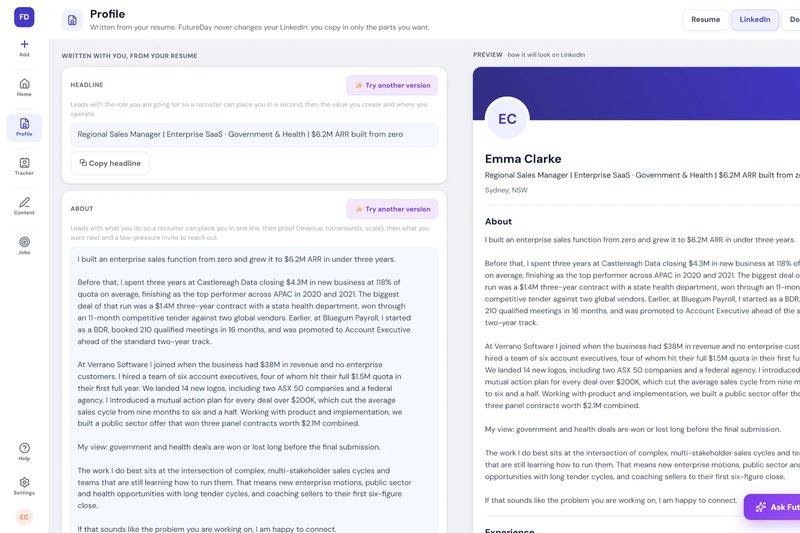
FutureDay's LinkedIn Optimiser writes your headline, About and up to 25 skills from your resume and copies your roles across word for word, with a live preview. It comes with seven guides for the parts no writer can do, and you paste it into LinkedIn yourself.
Everyone who hears your name looks you up before they reply, so your profile is a landing page, not an old resume pasted in. If the resume is done properly, the profile is a translation job.
A LinkedIn profile has three jobs in order: get found in search, get believed once someone lands on it, and demonstrate real authority. Twelve sections carry those jobs between them.
Get found: headline (job title first), skills, and visible contact info.
Get believed: photo (21 times more profile views with one, by LinkedIn's own figures), banner, About (only 2-3 lines show before a click), experience written as outcomes not duties, education, and recommendations from former managers.
Demonstrate authority: Featured as proof rather than assertion, active posting history, and a clear next step for anyone who lands on the page. The headline, the About section and your two most recent roles do most of the work.
 21 pages, a 15-minute read